
Google Workspace + n8n = pelen system automatyzacji firmy. Gmail jako inbox, Calendar jako scheduler, Sheets jako baza, Drive jako file storage – polaczone z n8n daja moc godna Salesforce Workflow Studio (ale za 0 zl). Ten przewodnik pokazuje 10 use cases + setup krok po kroku.
10 powerful use cases
- 1. Lead z formularza -> Gmail -> Sheet -> Calendar event: pelen lead lifecycle automated
- 2. Faktura wystawiona -> PDF na Drive -> shared link -> klient email
- 3. Nowy event w Calendar -> SMS reminder klientowi 24h przed
- 4. Email z Gmail z label „Zwrot” -> Trello card + Slack alert
- 5. Codzienny report sprzedazy -> Google Sheet -> wyzwol Looker Studio refresh
- 6. Faktura przelew -> Sheet log -> Slack notify CFO
- 7. Nowy contact z HubSpot -> Sheet master backup + Drive folder z dokumentami klienta
- 8. Spotkanie zakonczone -> auto-summary email do uczestnikow + Sheet log
- 9. Lead score > 80 -> Calendar event z handlowcem + email confirmation
- 10. Form submission z error -> Sheet log + email do supportu

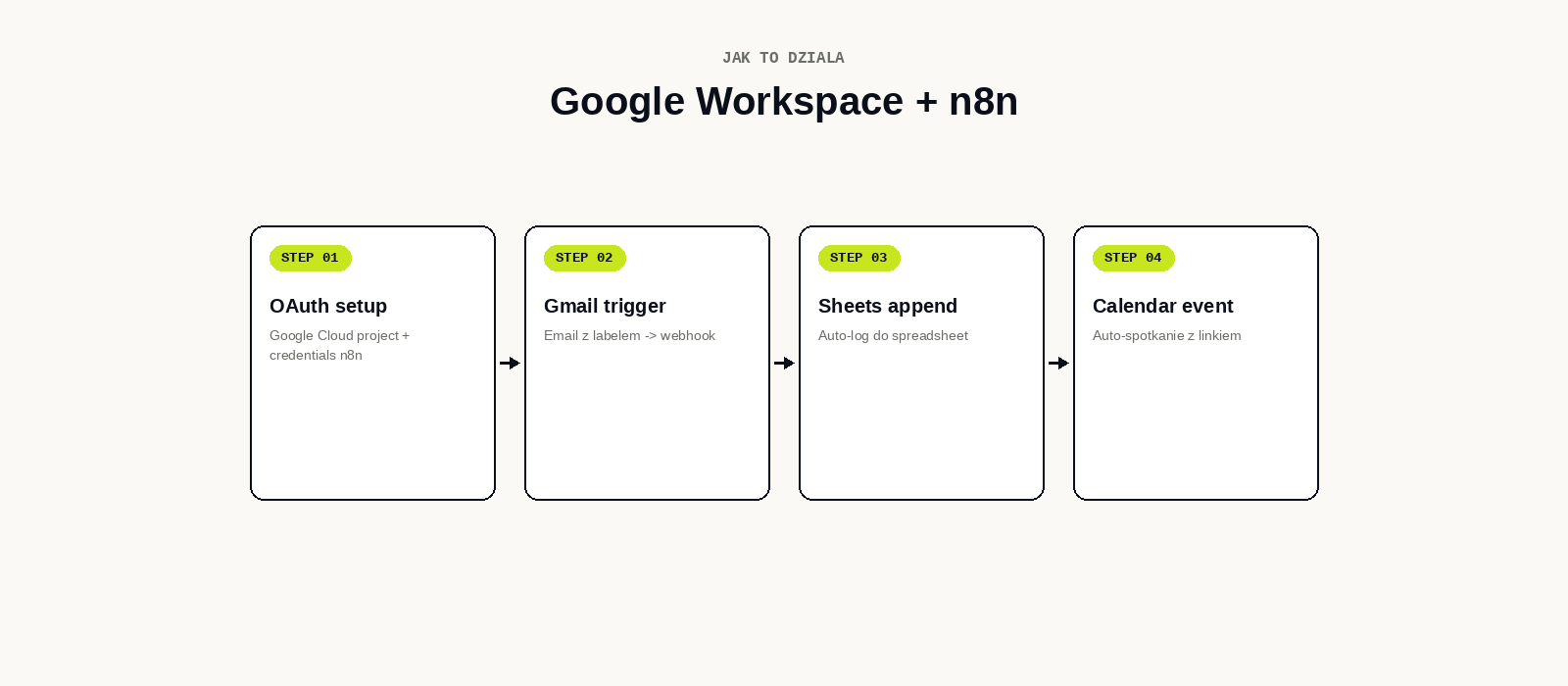
Setup: Google Cloud project + OAuth
Krok 1: Google Cloud project
Wejdz na console.cloud.google.com, Create Project, nazwa „n8n-integration”. Tojo personal account = gratis (z limitami).
Krok 2: Enable APIs
APIs & Services -> Enable APIs. Wlacz: Gmail API, Google Calendar API, Google Sheets API, Google Drive API. Wszystkie gratis do limitow.
Krok 3: OAuth Consent Screen
APIs & Services -> OAuth consent screen. External (jesli Twoj Google to gmail.com) lub Internal (jesli masz Google Workspace). Wypelnij: app name „n8n”, support email, scopes.
Krok 4: Credentials
APIs & Services -> Credentials -> Create -> OAuth Client ID -> Web application. Authorized redirect URI: https://twoja-n8n.com/rest/oauth2-credential/callback (zamien na Twoj n8n URL).
Krok 5: n8n credentials
W n8n: Settings -> Credentials -> New -> Google Calendar OAuth2 API. Wklej Client ID + Secret. Connect My Account. Login do Google. Authorize. Done.
Powtorz dla Gmail OAuth2, Google Sheets OAuth2, Google Drive OAuth2 (uzywa tego samego Client ID).
Workflow Example 1: Lead -> Gmail -> Sheet -> Calendar
Use case: lead z WordPress formularza -> auto-email z PDF oferty -> log do Sheet -> calendar event z handlowcem za 24h.
Setup w n8n:
- Webhook node: odbierz POST z WP form (name, email, phone, interest)
- Gmail node: send email do leada z PDF oferty (attachment)
- Google Sheets node: append row do „Leads 2026” sheet (timestamp, name, email, interest)
- Google Calendar node: create event „Call z {{name}}” jutro 14:00, invite [email protected] + {{email}}
- Slack node: post do #sales channel „Nowy lead: {{name}} – {{interest}}”
Czas setup: 20 minut. ROI: oszczednosc 5 min/lead x 50 leadow/mies = 4h/mies.
Workflow Example 2: Faktura -> Drive -> Klient
Use case: po wystawieniu faktury w Subiekt – PDF zapisany na Drive, shared link wyslany do klienta przez Gmail, log w Sheet.
- Webhook: trigger z Subiekt po wystawieniu faktury
- Google Drive: upload PDF do folder /Faktury/2026/06
- Google Drive: create shareable link (read-only)
- Gmail: send email „Twoja faktura {{nr}}” z PDF attachment + shared link
- Sheet: append row (timestamp, klient, nr, kwota, link)
Workflow Example 3: Calendar -> SMS reminder
Use case: 24h przed spotkaniem – SMS do uczestnika z linkiem do call.
- Cron: codziennie 9:00
- Google Calendar: list events ktore odbywaja sie jutro
- Loop: dla kazdego event
- HTTP (SerwerSMS): wyslij SMS „Przypomnienie: spotkanie jutro o {{time}}. Link: {{meet_link}}”
Twoj klient nie zapomni o spotkaniu = mniej no-show = wiecej obrocow.
Gotchas + limity
1. Gmail rate limits
Free Gmail: 100 emaili/dzien przez API. Google Workspace: 2000/dzien. Jesli wysylasz masowo – uzywaj Brevo/MailerLite, nie Gmail.
2. Google Sheets limits
Free: 5M cells/spreadsheet, 1000 API calls per 100 sec. Dla MSP: ogromnie wystarcza.
3. OAuth Refresh
Google OAuth tokens wygasaja po 1h. n8n auto-refresh ich uzywajac refresh_token. Jesli widzisz blad „Token expired” – reconnect credential w n8n.
4. Google Cloud OAuth verification
Po 100 unique users -> Google wymaga app verification. Dla wewnetrznej automatyzacji: Internal app w OAuth consent (jesli masz Workspace). Free Gmail: zostan External + verification po przekroczeniu 100 users.
Cost
- Google Workspace: $6-$18/uzytk/mies (jesli masz) lub free Gmail
- n8n self-hosted: 20 zl/mies VPS
- Google APIs: gratis do limitow (Gmail 100/dzien, Sheets 1000 calls/100s)
FAQ
Czy Google Workspace plan jest wymagany?
Nie. Free Gmail dziala dla wiekszosci use cases. Workspace daje: wieksze limity, custom domain ([email protected]), shared drives, admin controls.
Czy moge automatyzowac wysylke z firmowego maila bez Workspace?
Tak, ale: Gmail Free pozwala na [email protected]. Custom domain ([email protected]) wymaga Workspace lub email forwarding setup.
Czy mam dostep do firmowego Gmail przez n8n?
Tak, jesli jestes adminem Workspace lub user dal Ci OAuth permission. Dla wspolpracy: stworz service account z domain-wide delegation – n8n uzywa service account zamiast user OAuth.
Pomagamy setup Google Workspace + n8n integration. Setup video call 1h: kreujemy 3 workflow pod Twoja firma.